This is a random PSA to hopefully help out anyone who is confused about what the fuck it means to say I’ll see you at eight bells then, for example. Maybe you are just getting into Age of Sail RP or fiction, or maybe you’re playing crew on a Star Wars ship that uses the bell system (the Chimaera does, for example) and want to use and understand them.
The bells are how mariners measure time on a watch system. It’s hundreds of years old, but it’s actually still in use today. Not all ships use time-keeping bells, but about two-thirds of the ones I’ve worked on do, and it’s traditional to give a captain a ship’s clock when he retires, so he’s never without the chimes. Essentially, it’s old-school, but still relevant.
There are eight bells – one for every half hour of a four-hour watch. So, for example:
0000 – eight bells 0030 – one bell 0100 – two bells 0130 – three bells 0200 – four bells 0230 – five bells 0300 – six bells 0330 – seven bells 0400 – eight bells
0430 – one bell 0500 – two bells…
And so on and so forth throughout the day. Every ship I have worked on has been split into three navigational watches (although deck working hours are not determined by the watch). These are
So each of those watches consists of eight bells. Thus, six bells could be three o’clock in the morning or eleven o’clock at night, for example.
Anyway! I was just talking to a friend about it this morning and realized how confusing it might be for non-mariners who’ve seen it referenced once or twice but never really had anyone explain it to them before. I’m sure plenty of these posts already exist explaining it, but I also know that one of my first attempts at writing anything Age of Sail was years ago, before I became a professional mariner. I was trying to do a Master & Commander RP with someone who was extremely, ah, snooty about her Age of Sail knowledge, to put it as nicely as I can, and wouldn’t (or secretly couldn’t) explain it clearly. Since I didn’t understand them at that point, it really felt like one of those little details that can be overwhelming in a niche fandom, and put me off of trying to RP anything like that again. So, hopefully this helps prevent something like that from happening to other people ❤
The bell system really is simple and easy, and once you understand it, it can make writing characters on a navigational (or engineering) watch a lot more fun.
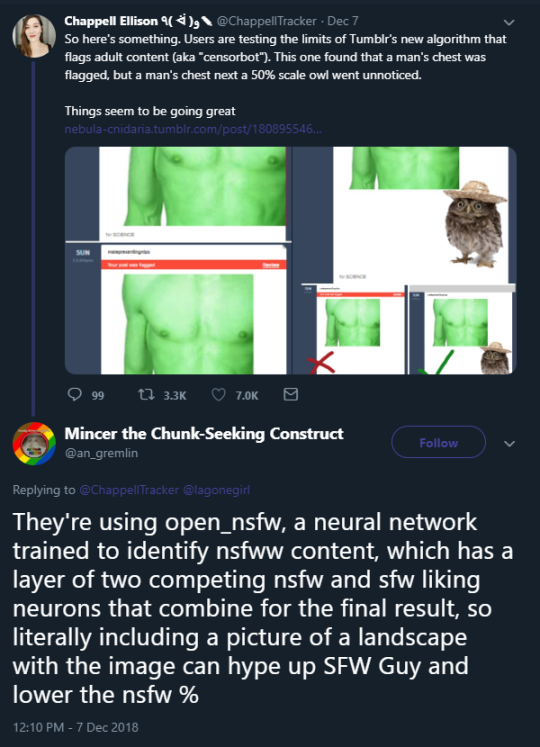
Now, the alarming aspect of this story is that the very same technology is probably what tumblr is using to identify porn. Now, if it can’t tell that an empty field is not, in fact, full of sheep, what hope do we have that it can’t tell an empty room isn’t full of writing human forms engaged in passionate coitus?
this really does sound like an episode of black mirror
This is gonna produce some absolutely baffling pornography.
…. oh my fucking god they actually are using open source software. They’re using a fucking one-layer unidirectional bicategory tag-trained neural network. This will never work. Literally, it will never work. There’s just not enough algorithmic complexity to do what they’re asking of it. I bet you I could prove on a mathematical level that this joke of a neural net fundamentally lacks the abstraction necessary to do its job.
This will never get better. Their algorithm will never stop fucking up, it will never actually flag porn reliably and it will always require a massive quantity of human hours to deal with the deluge of mistagged pictures. This isn’t just a case of an insufficiently trained algorithm, it’s just … this is the most basic neural network you can make. It probably hasa a lot of neurons and has loads of training data but like … you can’t just brute force this kind of stuff. One layer of neurons is just Not Enough.
Also, just to make this clear, Tumblr lied. I mean, we already know this, but I mean they liiiieeeeed. All that stuff they promised about what would or would not be censored? That cannot be delivered on with a system this simple. Nude classical sculptures, political protests, male-presenting nipples (really Tumblr?), nude art outside the context of sex, all that? You cannot train a bicategory one-layer neural network to exclude those things. It cannot be done. Tumblr never intended for those things to actually be permitted, they were just lying. Because the system they have cannot actually do what they said it would and never will be able to.
Also, this kind of system is super vulnerable to counter-neural strategies. I bet you before the end of the month someone hooks up their own open source one layer bicategory neural network which puts an imperceptible (to humans) layer of patterned static over arbitrary images, and trains it by having it bot-post static-ed images to Tumblr and reinforcing based on whether the images are labeled nsfw or sfw. Seriously, within a month someone will have an input-output machine which can turn any image ‘sfw’ in Tumblr’s eyes.
This is genuinely pathetic. Like, I have real pity for whoever implemented this, because it’s clear Tumblr doesn’t actually have any engineers with any expertise with machine learning left at all and they foisted the job off on some poor bastard who has no idea what they’re doing and is going to get all kinds of flak for their (perfectly reasonable and predetermined) failure from management.
As has been pointed out before, there are no humans behind this at all. The review process just reruns either the same algorithm or another algorithm, but people have posted screen shots showing obviously SFW pictures that were still deemed NSFW on review, despite the fact that any human, no matter how overworked / tired would have seen that these pictures were not porn.
Everyone is panicking over TOS-es right now as they find a new home as Tumblr gets flushed down the toilet. I don’t like those random TOS breakdowns because the analysis is always wrong.
Anyway this is what people pay me to do and I will now do it for $0 because I’m tired of everyone spreading misinformation. This post is not a substitute for legal advice etc. Reblogs are appreciated because I literally see TOS nonsense on my dash every day.
Any more experienced copyright lawyers please feel free to weigh in – it’s part of my field yes, but my wheelhouse is more film production COT rather than derivative works.
Google doesn’t have rights to do whatever they want to files you upload to Google Drive
Their TOSes are annoyingly broad in drafting but essentially boilerplate clauses that they need to host your work, use google translate on it, make it searchable etc. They cannot steal your fanfic. They cannot modify your art and use it for whatever.
Your work MAY be threatened (that is, deleted) thanks to FOSTA/SESTA, which imo is a clown provision signed by a clown that sent safe harbour down the toilet. This and this has more information (I’ve skimmed but not perused both), but the tl;dr is: similar to Tumblr, there was a ham-fisted attempt to protect victims of sex trafficking and all it really did was make cloud based services start deleting user files whether relevant or not.
Uploading work to dA doesn’t give them a license to sell it to Hot Topic. This post is incorrect. Debunked here and corrected by the artist himself here. Your art is safe.
There’s a breakdown of the TOS in there that’s pretty much wrong on most points, if someone wants me to do a not-wrong version, ask. This may help.
All you really need to know is that like Google, I checked it over and nothing in there puts you at risk for dA asserting ownership over your work or selling it – they need those rights for thumbnails, search functions, resizing etc.
Yum. I like this one. Easy to read and clearly explained for most people with basic reading comprehension. Section G – What We Do With Content will tell you everything you need to know.
Basically, they have the same clauses about you granting AO3 a license to modify/etc your work, but they take the trouble to explain to you exactly what that means, and how they use it to improve accessibility etc.
No history of content purges as far as I know. Explicit content is allowed with limits eg. no child porn.
Same deal – you’re looking for 1. WordPress – Responsibility of Contributors, with the exact same thing as everybody else. They also do a decent job of explaining what they use the license for (though once again, it’s standard), albeit not as beautifully as AO3.
Same old standard licensing clause, again doesn’t let them steal your stuff.
Incredibly…open content policies…you can basically do whatever you want so long as you don’t break laws or commit fraud it seems? If I’m wrong, feel free to correct.
Hope this helps. Feel free to force me to read and explain any other site TOS documents. Again, more experienced copyright lawyers, feel free to correct me if I clowned up somewhere.
This paper’s a little dense, but it’s by a trans researcher, and highly worth a read if you’re interested in the implications of Automatic Gender Recognition (AGR) technology
During a viewing of a house, take photographs of everything to study later at your leisure. It’s easy to overlook painted-over water damage that stands out in stark relief once you see it on a screen. Prod at everything that isn’t capable of prodding back. (If it is capable of prodding back, it is either electrical or alive, so unless you have an infestation of puppies inside your walls, the latter is a problem.) ANY damage, no matter how minor it is spoken of by an agent/owner, is damage, and is on them to fix. You are looking for a place to live, not a place to fix. If they want to sell to someone who is looking to Fix, walk away. Unless you, yourself, are looking to Fix.
(I never want to do that again unless I have the budget to point at people and pay THEM to fix it.)
Check Google reviews and choose your own home inspector for the closing. If the real estate agent/agency insists on using their own inspector, fire them and get a new agent/agency. That sort of thing is usually only for the benefit of the agent and inspector, not the future homeowner.
Tall grass can hide so many sins, and those sins are named cockroaches.
When the sins are not named cockroaches, they are named rot, mold, and flood damage.
Watch a LOT of “Holmes on Homes.” Canadian show, used to air on HGTV and is probably all over YouTube. It’s got a lot of useful visuals and stories that will teach you what is Code better than a handbook. Also, Mike is fun.
Insist that any problems that are found be fixed before closing. If they aren’t fixed, it’s lawsuit time or walking away from the sale time to find another place. If those problems are not fixed before close, chances are high that they will never be fixed by those who once promised to fix them, and you’re out more out-of-pocket right at the start.
Don’t buy a house on a floodplain unless you can afford the flood/hurricane insurance. If you can afford it and fully understand and comprehend that your house may be underwater once a year, go for it.
If there is water in the basement, Nope Out. You don’t need that kind of stress in your life.
If the option exists, get a home warranty, especially if it’s a new build. Unless you are there babysitting them, far too many construction crews will faff off and cheap out on their work. (For the price point that this rental would sell for, omg did the construction people go fucking cheap. The owner wasn’t here to babysit, and it shows.)
While house-shopping, find an accomplice who is allergic to mold and take them to every viewing. They are your walking radar. Buy them allergy meds, migraine meds, and whatever else they require as bribery, for they will always know if your maybe-new-house has mold, and avoiding that clusterfuck is worth the bribery expense.
If you’re looking to settle long-term, be absolutely certain you are happy with the place. Ask the selling agent if you can do an overnight in the house. If not, ask for a day. You want to find out if you notice any strange smells that a simple walkthrough doesn’t reveal. You want to know what it feels like at night. You even want to know if that fucker is haunted; if you’re paying to have a roommate, you at least want to know in advance if you’ll like them, since you’re probably stuck with them.
Radon. Asbestos. A homeowner wants not these things.
Also, view the home more that once. If the residence is being lived in before it’s sold, try to get at least one viewing on the shortest notice possible. If there is a problem that they are hiding with shiny paint and spackle, it’s harder to hide if they haven’t gussied up the place for a viewing.
Check the neighborhood. If the little lawn flags reveal that everyone else is using pest control services, chances are high that you will need to do the same. Some places this is a Red Flag; other times it just means you live in Florida.
Think handicapped friendly. You may not need a chair now, but what if
you have friends who rely on that 36″ doorway? What if you fall down in
ten years and can’t get back up and suddenly you need 36″ doorways and
chair access you never had to think about before? Fuck, even consider crutches.
If you have to climb fifty steps to get into your house, you will cry
if you ever sprain an ankle. Also, if this is the place you’re going to
live for the rest of your life, yes, you have to consider what it will
be like to live there when you are 80 just as much as when you are 30.
Remodeling for full handicapped access is a pain in the ass, and if your
doorways and the like are not to code, consider getting that renovation
done before you move in.
Don’t trust open house viewings. It’s like a viewing at a funeral home–just because there is a pound of makeup and fancy clothes on the corpse doesn’t mean that it is no longer a corpse. Go view that house at a time when it is not on public display to find out what it’s like when the scented candles and fancy centerpieces have been put away.
If you are a first-time buyer at a certain budget, FHA, baby.
If you haven’t already done so, go make friends with a credit union, open an account, and get your mortgage through them. They won’t sell you off to the highest bidder right after you close on the loan. Also, they’ll be more honest as to what you can afford and what interest rate you’ll qualify for, and it will usually be far lower than what anyone else can offer.
If your new place will have a yard, go for drought-friendly landscaping, a yardful of rocks, and/or raised beds for gardening. Lawn care is a stupid pain in the ass and you will come to resent it unless you are Neville Longbottom.
So for a full 17 minutes, my Tumblr was terminated without any notice. As in…I hit post and my blog was terminated immediately. I had posted asking for feedback on web-hosts that would host adult blogs and had asked about one specific site (Name Redacted)* which I have now learned is a web-host that is not allowed on Tumblr. So I have my feedback about Name Redacted…just not quite the way I expected.
The good news is that Tumblr restored my blog quickly (thank you Staff for the swift response). But I stand by my previous comment:
“Even if you do not have any NSFW images/content, import or backup now now. Tumblr is flagging everything from rocks to carrots and once Dec 17 hits, you may not be able to download a backup or import the full blog into WordPress if items are flagged/made private. Or Tumblr may roll over on the morning of Dec 17 like a drunken sailor and crush your blog into pieces even if you’ve only posted a few Sesame Street photos (yes they flagged Big Bird too).
“
*I had also included a partial link to the site in the following format because I had been warned that Tumblr is cracking down on external links. I can tell you that this will not offer you protection folks.: ex: fakelinkfakelink(.)com will not save you.
Support wrote: “In the future please refrain from posting links or content from sites that violate our policies on Spam & Deceptive links (like Name Redacted) or your account will be automatically terminated again.”
Another important note: I partially listed the URL of an adult web-host in my post for the sole purpose of asking for input about the web-host. The web-host appears on many “Top 10 Adult Web-hosts”. Bottom line: there are no “safe” ways of communicating on corporate owned platforms.Look at what is happening on Facebook, Messenger and Instagram. Even your private communications on these platforms can be censored (and yes this time I am using the word censor).
You can force Twitter to post the “raw” quality of your pics by adding one (1) pixel of transparency in the image.
Twitter uses some algorithm to compress images into .jpg, but it cannot do that if there’s transparency involved in the image, forcing it to be .png in its full quality. Literally one singular pixel ANYWHEREcounts for this, it can be on a corner if you don’t want it to be bothersome.
Figured some folks might be interested in this, considering Tumblr no longer supports the _raw trick.
For the sake of example instead of hearsay, I’ve posted a comparison in my Twitter here, but will also explain here. All images are 2000x2000px versions of my logo you can see on the top left of this post:
The myth that panic, looting, and antisocial behavior increases during the apocalypse (or apocalyptic-like scenarios) is in fact a myth—and has been solidly disproved by multiple scientific studies. The National Earthquake Hazards Reduction Program, a research group within the United States Federal Emergency Management Administration (FEMA), has produced research that shows over and over again that “disaster victims are assisted first by others in the immediate vicinity and surrounding area and only later by official public safety personnel […] The spontaneous provision of assistance is facilitated by the fact that when crises occur, they take place in the context of ongoing community life and daily routines—that is, they affect not isolated individuals but rather people who are embedded in networks of social relationships.” (Facing Hazards and Disasters: Understanding Human Dimensions, National Academy of Sciences, 2006). Humans do not, under the pressure of an emergency, socially collapse. Rather, they seem to display higher levels of social cohesion, despite what media or government agents might expect…or portray on TV. Humans, after the apocalypse, band together in collectives to help one another—and they do this spontaneously. Disaster response workers call it ‘spontaneous prosocial helping behavior’, and it saves lives.
I’ve been sharing this article a lot recently! I think it’s important
I’ve been asked about Dreamwidth, since I have a little time I’ll give a quick explanation, so you can decide if you’re interested in making one. I’ll skip on how to actually make one and all the setting, because I’m pretty sure there already are a thousand tutorials and I’m sure everyone knows how to join a social anyway.
So..like basically anything else Dreamwidth has different sections.
Recent Entries is what YOU post, basically your blog. Archive shows you your posts in a calendar, you can choose to simply see the number of posts for that day or to show the subject too (obviously if you’ve used a subject/title. You can use one for everything, not just text like here) Reading is where you actually see what the others posted. Tags is self explanatory, it’s a list of your tags, you click on one and it will show all the entries for that one (in your blog, it’s not a search tool). Memories is something in between a bookmark and a like. If you’re interested in a post you put it in your memories, to be able to find (and follow it) at any given moment. Profile is where everything about you is (we’ll get to that in a second)
So, now we’ll go to the profile page (EVERYONE can see this, non-members too).
Part 1 of the profile. There’s your blog title and subtitle, near the default icon (in the free version you can upload up to 15 icons, don’t remember about the payment account) and stuff like when it was created, the number of posts, comments left and received…basically all your statistics. Under it there’s the about, that basically shows what you can see, name (could be different from the name you’re using for your blog, like your real name – not that someone will write their real name there, lol, but I used Ginny), birthdate, location…that kind of things.
Part 2. First we have a bio. You can write whatever you want there, it needs basic html code for certain things like bold, italic, etc, and for photos to be hosted somewhere else (or like…copy the image link of the photo you posted somewhere else and paste that there between the classic html code for images). In my case the red “thingies” are hosted on photobucket. Dreamwidth gives you the opportunity to upload things on their own space, but I’ve never used that, so you’ll have to search for that yourself The bio is also a good place to put credits for your layout, if you’re using someone’s graphic as a header and so on. You want everyone who finds your account to know that you want to adopt all the cats or to ride an unicorn? The mini bio is the place to let them know! Go crazy, write whatever represents you! Under it there’s the “connect” section. Interests. You literally write what you’re interested in, separated by commas (ie. cats, dogs, unicorns, lasagna). This will get your blog in the search for those words (ie. you’ll appear if someone will search “cats”) and will work as a shortcut for you to search for others with that interest (instead than writing the word in “search” and click…not that it’s very tiring to do, but whatever, lol). Basically, be nice and try to stick to what you usually post about, if you post about cats and once a year you post the photo of a dog wouldn’t be so nice to lead people who likes dogs to follow you…
Under that there’s people (and communities)
People. Are the personal blogs, like mine. It’s divided in different section, that are: Gives access to. The people you want to see the post you’ll set as restricted (meaning you can decide to make a post visible ONLY to those people and not to strangers) Has access from.
Who let you see the posts they’ve set as restricted.
Subscriptions. The blogs you’ll see in your reading page. If a blog won’t give you access you can still subscribe to it and you’ll see their public posts. You can also decide you don’t want to see someone in your feed (maybe you like them but they usually posts things you’re not interested to), so you’ll grant them access to your blog, probably they’ll grant you it to theirs, but you’ll have to manually go to their blog to see the updates. That’s a feature I badly miss on tumblr. Subscribers. Is basically the same thing, who has you in their reading list.
Communities. The word is pretty self explanatory, they’re groups about a topic. Usually (like the 99% of the cases) any member can post (there are admin and moderators, if they know how to do their job the community will stay pretty and neat). Member of. Lets you know the communities you are in. Subscription. Is the comms you see in your reading page (again, you can be in a community, post in it and all but decide not to see it in your reading page, maybe because it’s huge and there are too many post a day, or whatever other reason) Administrator. The communities you started and the ones you are made admin of. Posting access. Obviously are the communities where you can post (the famous “usually 99% of them”)
Now we’ll get to the posts structure, just to give you a quick idea of what you can do there.
The first part is the entry itself. You can change the date, choose the icon, give the post a title. Then you can select “rich text” to have the bar with all the commands (like a Word sheet) or HTML (the one I used here, I have to code things by hand, like the < b > for bold and such). Obviously the two options “insert image” and “embed media” will only be present in the HTML version, the Rich Text has a button for it. Here, have the Rich Text bar
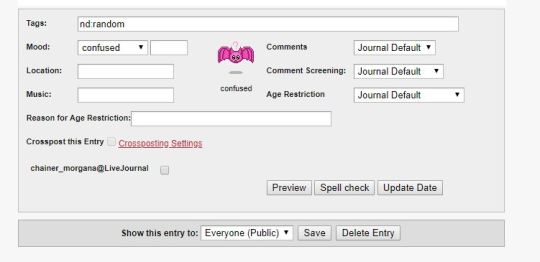
Now that you have happily written your post, inserted links, added photos, tables and all you scroll down and you have the second part.
That’s the funny part, IMO. Tags (in this case I usually advice to use real tags and not the kind we use on tumblr to basically comment, since they’re a very useful tool to find your old posts) Mood. There are a lot of them or you can add one (the empty space). The icon can be changed, I chose the bat because I like bats, but there are a lot of them. Location whatever you want from “my bed” to “in China”, it’s not a gps location or anything. Music whatever you’re listening to. NOTE: all these can be left empty. Comments. Journal default is whatever you’ve decided in your settings about who can comment your post, but you can change it. You can choose, instead, to disable it for that post. Or not to have an email notification sent to you for that particular post. Comment screening. What comments will be visible? Other than the default you chose in the setting for every post you can decide to disable the thing, so all comments will be visible or to HIDE: anonymous comments, comments from people who don’t have access to your blog or all comments. Age restriction. Hot topic these days 😉 First of all in your settings you will already be able to decide if you’re a 18+ blog or not and why, but you can also say you’re not and simply restrict some posts. The choices are no restriction, viewer discrection advised and only 18+. As you can see under that, if you want, you can let people know the Reason for Age Restriction (a lot of things, not just porn, are 18+) Crossposting. I admit I don’t know what you can crosspost to, I had my lj, but things change. Anyway you can decide if post it on both the thing or just on DW. The “spell check” button is lovely 😉 Show this entry to will let you choose. To everyone, to your access list or to just keep it for yourself.
This post isn’t in any way comprehensive, but since I’ve been asked about dreamwidth I think it’s a good way to introduce you to the basics of what you can do, the privacy, mostly. Obviously it’s a lot more complicate than that, there are A LOT of features, I only showed how a post is made and the profile, but you can manage EVERYTHING, you can customize most of it, you have an inbox that will show you the new comments (there’s also a section to see them), who granted you access, who wants to join a community and so on…It’s a pretty complicate platform, nothing that can be explained in a post.
If you need any information don’t hesitate to ask, and if you think this post can be useful then share it! thanks!
This is an excellent introduction, and I agree that Dreamwidth has many more features to discover as you use it. But I want to highlight one in particular: in addition to the privacy controls mentioned above, Dreamwidth lets you create custom filters for both posting and reading. You can restrict your content to different subsets of your access group and/or read different subsets of the journals you follow. Once you’ve created the filters, it’s easy to select and change them as you like.


 Site Title